
Lesson Lab
The first month of the school year sets the tone for everything that follows. After 30 days, you should be able to answer one key question: Are my lessons really working for this student?
This article will help you to answer a proud “Yes!” to this question. Here’re some quick music teacher tips.
Test retention with micro-reviews
Instead of asking “Did you practice?”, check retention through:
- Mini pop quizzes: Ask them to play piano songs learnt last week without looking at notes.
- Flashback moments: Drop a short activity from an earlier lesson to see if it “sticks.”
- Explain it back: Have them teach you a concept in their own words — if they can explain, they understand.

Vocal student singing a song learned in the previous lesson
Measure musical progress in 3 dimensions
Progress is more than speed or accuracy. Look for growth in:
- Technical skills — smoother fingerings, better intonation, fewer mistakes.
- Musicality — dynamics, phrasing, expression.
- Confidence — how boldly they start a piece, even if it’s not perfect.

Piano student practicing fingering
Track engagement, not just attendance
Logging in doesn’t equal learning. Notice:
- Energy levels. Does the student lean forward, smile, or light up when playing? Or do they look distracted?
- Participation. Are they asking questions, trying things on their own, or waiting passively for your lead?
- Consistency. Do they show up prepared, with homework done?

Music teacher writing down notes in the engagement journal after the online music lesson
Check the Joy factor
Music lessons aren’t just about discipline — they should spark joy. Ask directly:
- “What part of the lesson did you enjoy most this week?”
- “What song do you wish you could play right now?”
- “Was there a moment you felt proud of today?”
- “Which exercise today felt easiest or most fun?”
- “Is there something new you discovered about your playing or your instrument today?”
These questions reveal if students are connecting emotionally, not just technically.

Guitar teacher asking feedback from student in the end of the lesson
Use parent feedback (for younger students)
Parents often notice things that are invisible during a lesson: whether the child practices independently, hums or plays pieces around the house, or shows excitement about upcoming lessons. Their perspective can reveal motivation, consistency, and subtle progress that you might not catch in a 30–45 minute session.
A quick 2-minute check-in once a month can give you priceless insight. Create a simple 3-question parent check-in form (practice habits, attitude, motivation) and send it once a month. You can ask about:
- How often the child practices between lessons.
- Whether they show enthusiasm or frustration with certain exercises.
- Any new discoveries or favorite pieces they’ve explored.
By combining your observations with parent insights, you can get a well-rounded view of the student’s progress, motivation, and emotional connection to music.

Parents filling in a check-form sent by music teacher
Adjust before it’s too late
If you see boredom, frustration, or zero progress — act early:
- Switch repertoire: find a piece they love and practice it more often.
- Shorten exercises and build variety: try turning a technical drill into one of your music games to make practice feel fresh.
- Set a micro-goal they can achieve in a week to motivate students.
The first month is your best window to fine-tune before habits (good or bad) stick.
Use technology to your advantage: MOOZ
When it comes to online music lessons, MOOZ stands out as a platform designed specifically for musicians and educators. Unlike generic video call platforms, MOOZ offers music tools tailored to the unique needs of a music teacher.
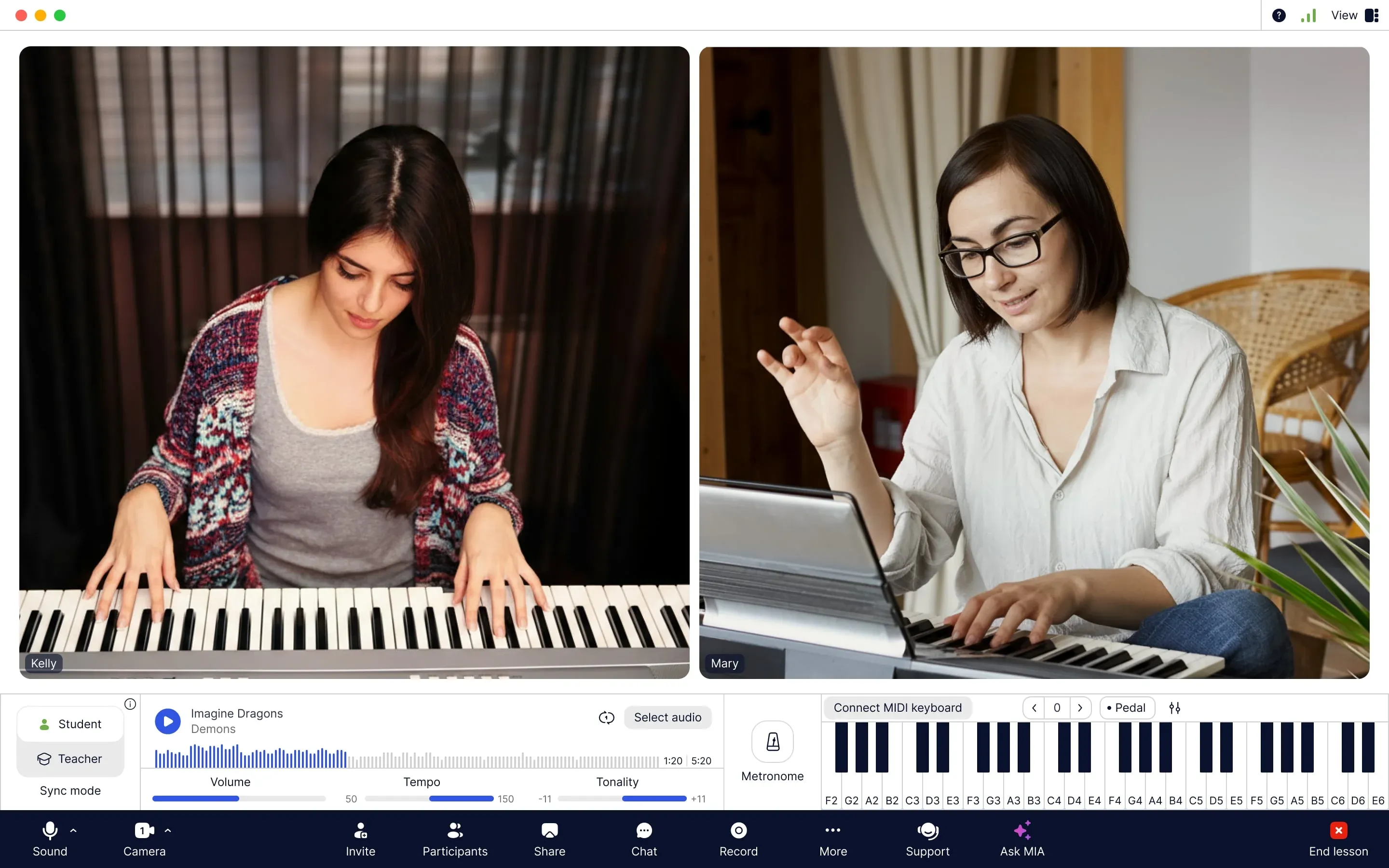
MOOZ app interface: call window with built-in music tools
Let’s see how MOOZ can help you track your students’ progress.
Key Features of MOOZ:
- Studio-Grade Audio: Clear, high-quality sound with no compression or latency.
- Built-in Music Tools: Virtual piano (+MIDI support), metronome, and player.
- Sync Mode: Keep backing tracks, metronome, or piano aligned in real-time.
- Multi-Camera Support: Connect up to 5 cameras to show hands, posture, face, sheet music, etc. simultaneously.
- File Sharing & Annotation: Share PDFs and sheet music, make real-time notes.
- Lesson Recording: Record lessons to review progress and reinforce learning.
Tracking student progress with MOOZ: quick guide
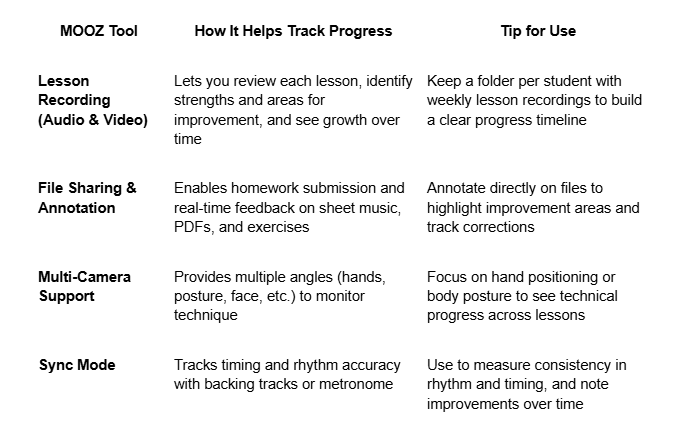
30 Days to measurable musical progress
At 30 days, don’t just ask, “Did they learn the notes?” Ask, “Did they light up while learning?” If the answer is yes, your online lessons are working. If not — your creativity, timely adjustments, and the right technology can change the outcome.
Keeping an engagement journal throughout the month makes it much easier to track student progress at the end of each month. You’ll have a clear record of participation, energy, and moments of joy — all in one place.
👉 Ready to make your first month rock-solid? With MOOZ, you’ll get crystal-clear sound, multi-camera views, sync tools, and lesson recordings — everything you need to keep students engaged and progressing. It’s one of the most powerful tools for music teachers, turning every lesson into an opportunity for growth.
🎁Bonus: download a quick checklist — and you won't miss a thing!

Related Articles

Before & After: MOOZ Multi-Cam Boosts Online Guitar Classes
Learn how MOOZ Multi-Cam system dramatically elevates online guitar lessons.
Music Teachers and Time Management: Burnout Cancelled
Drowning in lesson plans and admin? This guide helps music teachers master their schedule.

How to engage students in music class
Start each music class with an interactive warm-up, like rhythm games or call-and-response exercises.