
Lesson Lab
Gamification is transforming music teaching — especially online music lessons. Students respond better to fun vocal exercises, game-based piano drills, and challenges that feel more like play than pressure. But the real breakthrough comes when you combine gamification with another powerful mindset: thinking like a YouTuber. Successful creators have mastered short, engaging, rewarding content — exactly what modern students crave.
This guide brings together real, classroom-tested music lesson activities, piano lesson games, and vocal warm-ups, plus how to run them seamlessly inside MOOZ — the platform built for modern online music lessons.
Why Gamification + YouTuber Mindset = Winning Formula
The Psychology of Gamification in Music Teaching
Gamification works because it mirrors how students naturally stay engaged. When vocal warm ups turn into micro-challenges, when piano lesson games have clear “levels,” and when music lesson activities offer quick wins, motivation rises fast.
- Clear Goals + Instant Feedback: Students know exactly what to achieve, from daily vocal exercises to speed drills.
- Visible Progress: Leveling up, unlocking goals, and tracking skills keep motivation high.
- Reward Loops: Badges, streaks, and small wins encourage consistent practice.
- Healthy Competition: Perfect for group classes and online music lessons.
- Playfulness Reduces Stress: Games make learning feel lighter and more creative.
Why Every Music Teacher Should Think Like a YouTuber
Successful YouTubers are masters of engagement, not just content. They intuitively use gamification principles that are perfect for music teaching:
- Micro-Content Beats Long Explanations: Teach in fast, focused bursts — a 30-second fun singing warm up, a 1-minute rhythm challenge. Short tasks = more engagement + easier wins.
- Hook First, Explain Later: Start with: "Hit this interval jump cleanly in one take" or "Copy this piano riff twice perfectly." Challenges make the lesson feel like a game from minute one.
- Every Lesson is an 'Episode': Structure lessons like a series: Warm-Up Episode → Technique Episode → Creativity Episode. Students feel progress like unlocking levels.
- Community & Interaction: Comments and likes create a feedback loop. Your students need that immediate, positive reinforcement.

Practical Games & Activities for Every Instrument
1. The Daily Challenge Game (Perfect for Voice & Piano)
Turn routine work into a micro-quest:
- 60-Second Pitch-Stability Challenge (ideal for fun vocal exercises)
- Clean Chord Progression x5 (great for piano lesson games)
- One Tricky Bar Mastered
- Fast Rhythm-Clapping Loop
In MOOZ: Share challenge cards via file share or screen share, and ask students to send back quick audio/video snippets using lesson recording. Great for building consistency without adding prep work.
2. Level-Up Quest (Your Gamified Music Lesson Plan)
Transform your music lesson plan into a structured adventure:
- Level 1: Basic fun singing warm ups
- Level 2: Technique focus
- Level 3: Performance task
- Level 4: Creative arrangement
- Level 5: Final “boss” performance
In MOOZ: Use lesson recordings and screen-shared notes to show before/after progress — one of the strongest motivators in music teaching.
3. Performance Bingo (Top-Rated Music Lesson Game)
Create bingo cards with squares like:
- Breath control
- Smooth legato line
- Expressive dynamics
- "No tension" challenge
- Clean articulation
In MOOZ: Share your Bingo grid via screen share, and have students “claim” squares by performing them live or sending short clips recorded during the lesson. Works perfectly with vocal warm ups and vocal exercises.
4. Warm-Up Roulette (Fun Singing Warm Ups + Instrument Games)
Create a wheel of quick tasks:
- Tongue twisters
- Interval jumps
- Staccato bursts
- "Frozen" note challenge
- Surprise piano riff imitation
In MOOZ: Share the roulette card via screen/file share and use the drawing tool to highlight selections. Use the virtual piano + player combo to demonstrate riffs, patterns, or instructions instantly.
5. Speed Skills Challenge (Essential Piano Lesson Games)
Build technique through tempo games:
- Scale accuracy at increasing tempos
- Chord-change clean streak
- Breath-length challenge for vocalists
- Rhythm speed rounds
In MOOZ: Use the built-in metronome and adjust tempos live. Students hear both the metronome and your cues clearly thanks to the optimized music audio and Sync Mode — perfect for precision work.
6. Duet & Team Quests (Best Games for Music Class)
Foster collaboration even in online music lessons:
- Harmony Challenge: Teacher records or plays a harmony line; students match or respond with their part.
- Rhythm–Melody Exchange: One side sets a rhythm, the other answers with a melody built on that pattern.
- Virtual Duet Arrangement: Build a two-part phrase step by step — teacher records Part A, student adds Part B.
- Call-and-Response Game: Short, fast challenges for pitch, rhythm, or articulation.
In MOOZ: Use Sync Mode, the virtual piano, built-in player, and metronome to run tight, clean team quests with natural audio.
7. Mystery Box Lesson (Universal Music Lesson Game)
Prepare 5 "mystery" tasks:
- A rhythm card
- A short melody
- A vocal pattern
- A piano motif
- An expressive challenge
In MOOZ: Reveal each “box” via screen share, then demonstrate patterns or motifs using the virtual piano or the built-in player if you need to play a reference track. Use the drawing tool to highlight key notes, shapes, or rhythmic accents so students grasp the task instantly.
Best Practices for Gamified Music Teaching
- Mix Technical & Creative: Balance vocal exercises with expressive challenges.
- Reward Consistency: Celebrate practice streaks, not just perfection.
- Keep It Short: Challenges should be 1-3 minutes maximum.
- Offer Choice: Let students pick between two fun vocal warm ups or game options.
- Make Progress Visible: Use lesson recordings, before/after clips, or screen-shared notes to show improvement over time.
- Celebrate Publicly: With permission, share wins in your studio's group space.
MOOZ Supports the YouTuber Mindset
MOOZ isn't just another video call platform — it's built specifically for music lessons, making gamification smooth and intuitive:
natural audio → vocal exercises, warm-ups, piano tone
metronome + virtual piano → rhythm and speed challenges
multi-camera views → “tutorial angle” and technique-focused games
lesson recording → instant replay and progress tracking
file sharing → mini “episode assets”
drawing tools → challenge grids or warm-up paths
file storage → your media kit, always ready
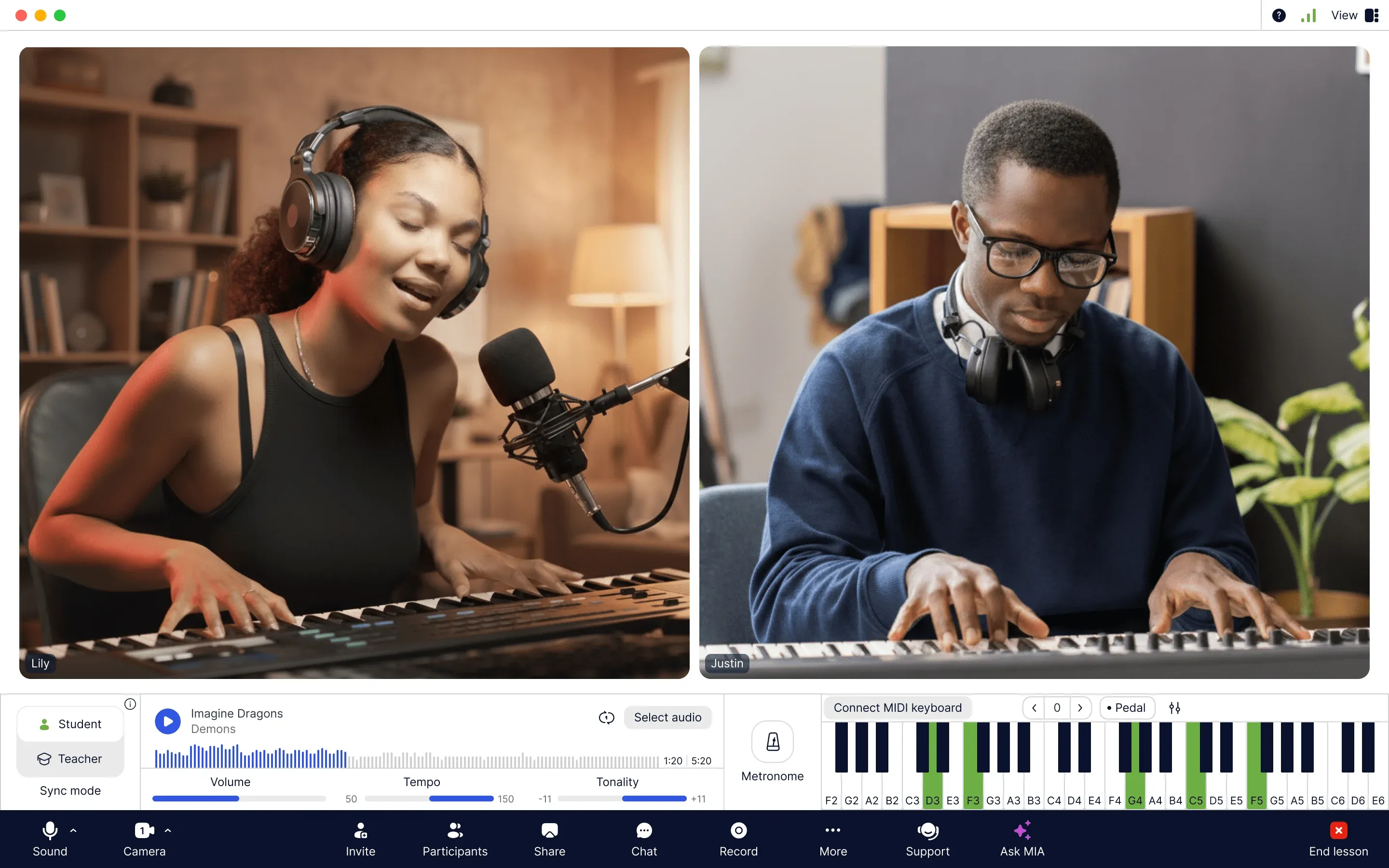
A YouTuber approach doesn’t mean making videos — it means designing lessons the way audiences actually engage today. It’s about viewing each lesson as an episode, each student as a community member, and each skill as an engaging challenge to be unlocked. It’s the ultimate fusion of gamification and effective music teaching.
Your Channel is Live. What's Your Next Step?
Stop just teaching. Start engaging. MOOZ gives you the platform to manage your studio efficiently and teach captivatingly, transforming your online music lessons into experiences students can't wait to return to.
Ready to make every lesson feel like an episode your students can't wait to watch? Craft your first viral lesson today.

Related Articles
Before & After: MOOZ Multi-Cam Boosts Online Guitar Classes
Learn how MOOZ Multi-Cam system dramatically elevates online guitar lessons.
The First 30 Days: How to Check Your Online Music Lessons Work
Read MOOZ's step-by-step guide to checking your online music lessons after the first month.
Music Teachers and Time Management: Burnout Cancelled
Drowning in lesson plans and admin? This guide helps music teachers master their schedule.